Tell it what you did. It keeps up.
A Kanban board you talk to. Say what moved. It moves.
Free for one person. No credit card.
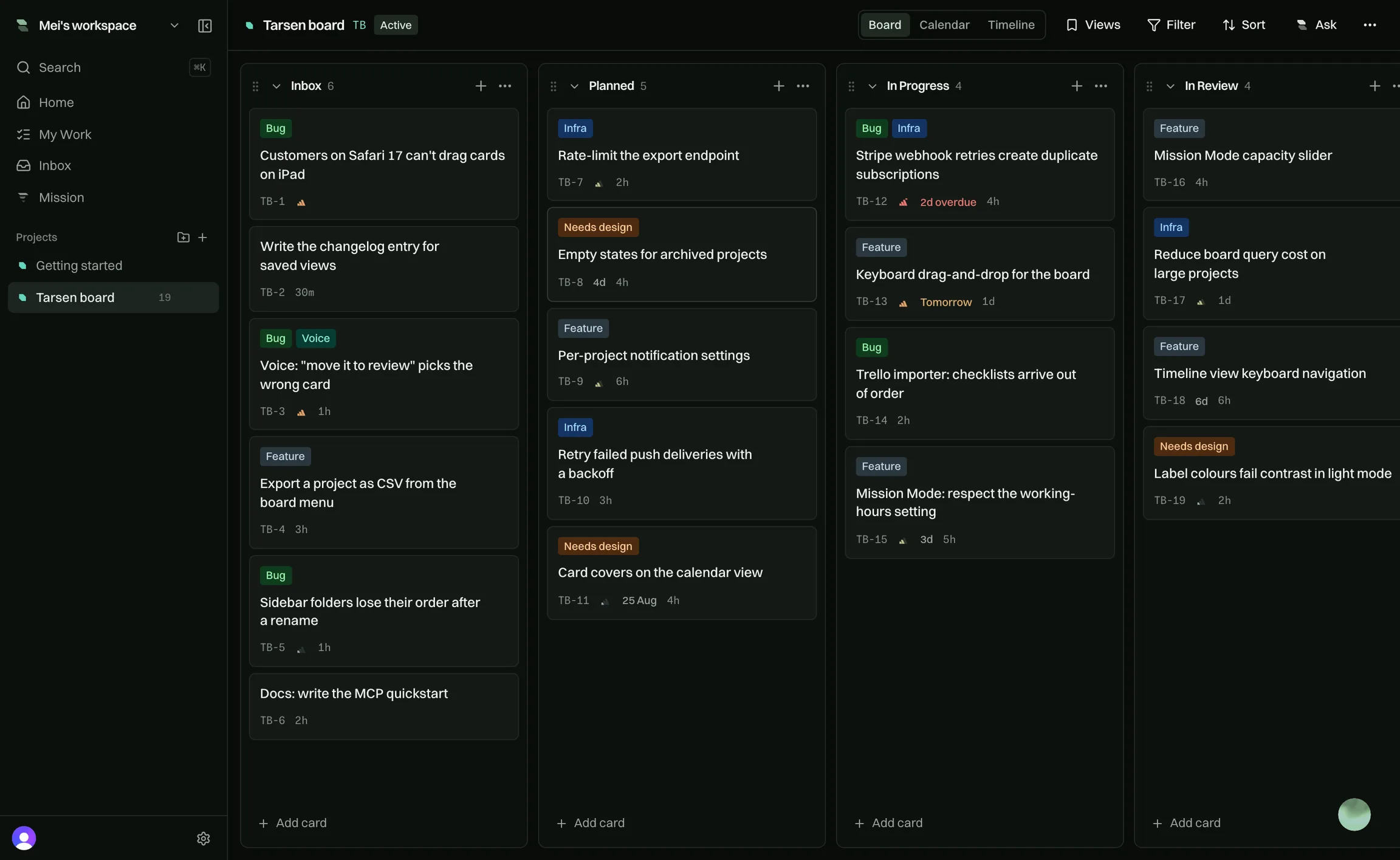
Underneath, a board you already know how to use.
Tarsen Voice
Press ⌘J and say it. The board keeps up.
Keeping a board honest is a second job.
You finish the work, then go and tell the tool about it. Most people stop by Wednesday, and the board stops being true.
So say it instead. This is not dictation into a box. It is the assistant that runs the board, listening.
Ask
- What am I working on?
- What is blocked?
- What did I miss?
Change
- Move billing to In Review.
- Make TAR-121 high priority.
- Assign it to Sam.
Make
- New card: chase the feedback.
- Start a project called Website.
- Add a column after In Progress.
Open
- Open the Tarsen board.
- Open my inbox.
- Search for the importer.
Twenty-four things, out loud. It also labels, comments, ticks off checklists and archives. It only stops to ask before it deletes.
Free: 15 minutes to try. Pro: 30 each, every month.
What is in ProThe board
Drag a card. This one is real, not a picture.
Inbox
2Planned
2In Progress
3/3In Review
2Done
3A card keeps its number for life. TAR-133 is always TAR-133.
Mission Mode
Say how many hours you have. It picks the day.
It reads what is assigned to you: due dates, priority, what is stalled, what is blocked. Then it hands you the few cards that fit in the time you have left.
- Every card tells you why it made the list.
- It runs with no AI key, on the free plan.
- It never moves anything without you.
Two cards are past their date and one of them is the Stripe duplication bug, so that goes first. The keyboard drag work is due tomorrow and mostly finished. The importer card is left out; it's still blocked on the Northwind export.
- 1
Stripe webhook retries create duplicate subscriptions
TAR-1334hOverdue by 2 days · Urgent priority - 2
Keyboard drag-and-drop for the board
TAR-1301dDue tomorrow · 5 of 6 checklist items done - 3
Write the changelog entry for saved views
TAR-14130mQuick win
Trello importer: checklists arrive out of order
Blocked, waiting on a real export from Northwind
Your team
Cards, comments and assignments move live. No refresh.


Mei moved TAR-130 from Planned to In Progress
2 minutes ago
Sam commented: Retry logic needs an idempotency key. @Arron is this on you?
9 minutes ago
Priya flagged TAR-128 as blocked
16 minutes ago
Mei assigned TAR-133 to Sam
24 minutes ago
Sam set TAR-141 to due tomorrow
31 minutes ago
A mention notifies one person, not the whole team.
Ask Tarsen
It answers from your own boards, not from the internet.
What's blocking this project?
Create 3 cards from these notes?
- · Add idempotency key to webhook handler
- · Backfill duplicate subscriptions
- · Add a webhook replay test
It changes nothing until you confirm it. AI can be switched off.
Works with your agents
Your assistant reads the board and changes it. No copying and pasting.
What is blocked on Roadmap, and who is it waiting on?
Two cards. TAR-128 is waiting on Priya, and TAR-141 is waiting on the client's copy.
Add a card to chase the copy. High, due Friday.
Created TAR-147 in Roadmap, high priority, due Friday.
Make an API key, paste one line into your assistant, and it is talking to your real workspace. 14 tools cover projects, boards, cards and comments. 5 only read. 9 can change something.
- It sees the projects you see, and nothing else.
- A card it makes is a real card. Your team is notified.
- Scope a key so an agent only touches its own work.
- Claude
- Gemini
- Codex
- Cursor
- GitHub Copilot
- Windsurf
Any assistant that speaks MCP over HTTP works the same way. How it works.
Free for one. Fair for a team.
Everything one person needs is in the free plan. Pro lifts the limits when you outgrow them.
Free
Everything one person needs to plan and finish a day.
Free forever
- Talk to Tarsen15 min, once
- BYOKNo
- PeopleJust you
- AI requests15 a day
- Mission Mode history7 days
Pro
For when the second person arrives and the limits stop fitting.
Billed monthly
- Talk to Tarsen30 min/person/month
- BYOKYes
- PeopleUnlimited
- AI requests100 a day
- Mission Mode history1 year
Lifetime
Bought once. Sized for a small team, and yours for good.
One payment. Never renews.
- Talk to Tarsen15 min/month
- BYOKYes
- PeopleUnlimited
- AI requests300 a month
- Mission Mode history1 year
Every plan includes the whole board, the command palette, search and filters, Mission Mode, an agent over MCP, Trello import, unlimited projects and export to JSON or CSV.
Prices in GBP. Pro is billed per person on your team each month — agents are free, and removing someone stops their charge. Cancel any time.
The things you’re actually wondering.
Tomorrow morning, open it and
know what to do.
Free forever for one person. No credit card, and no sales call.